Manage Every Client. Prove Every Dollar. From One Dashboard.
The multi-tenant platform that lets consultants, vCISOs, and MSSPs deliver enterprise-grade security assessments to every client — while tracking portfolio-wide risk reduction, compliance, and ROI from a single command center.
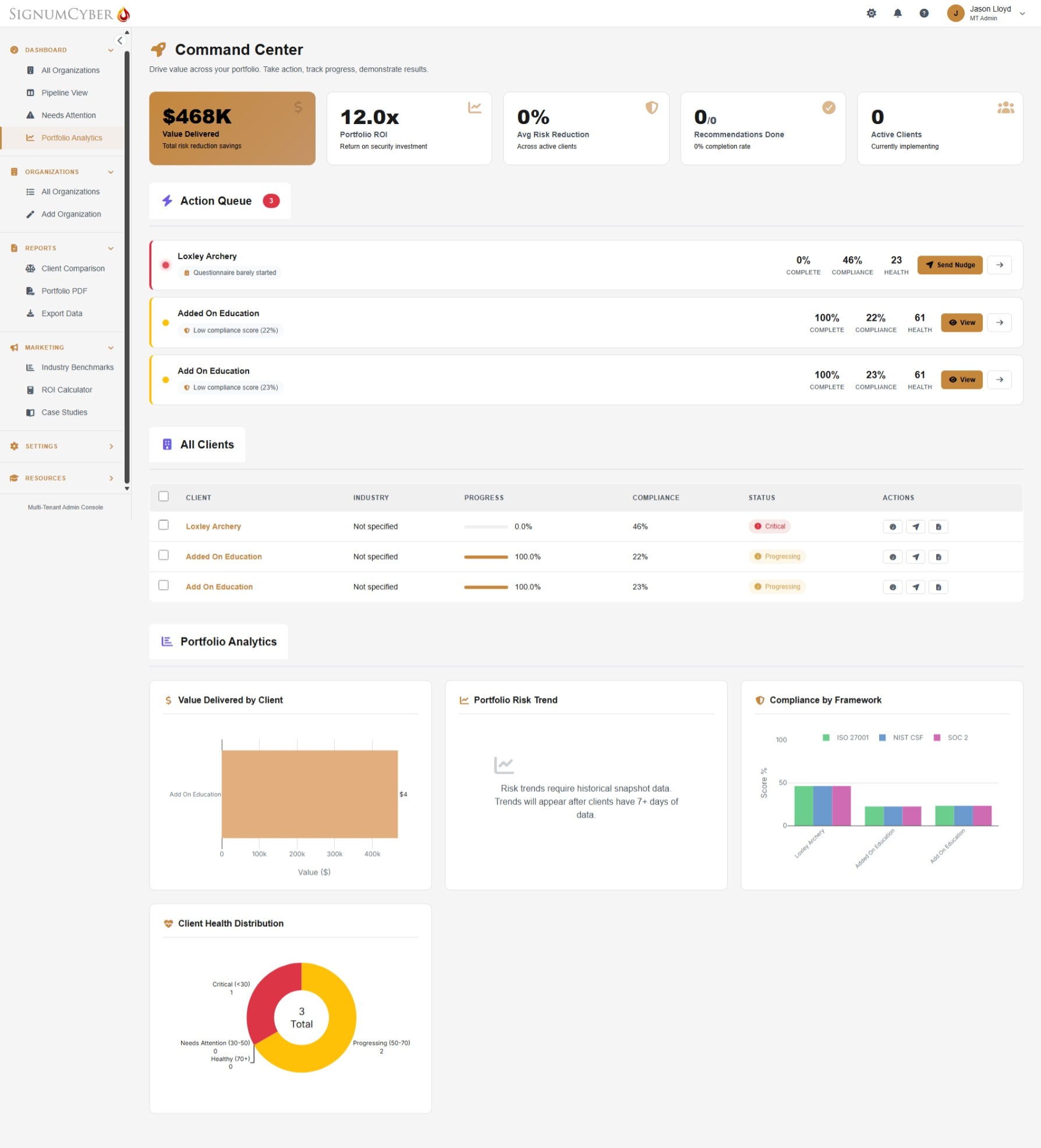
One Portal. Six Stages. Every Client Covered.
SignumVantage guides each client organization through a structured lifecycle — from onboarding to reassessment — while you track the entire portfolio from above.
Your Pipeline view shows every client's stage at a glance. Alerts fire when anyone stalls.
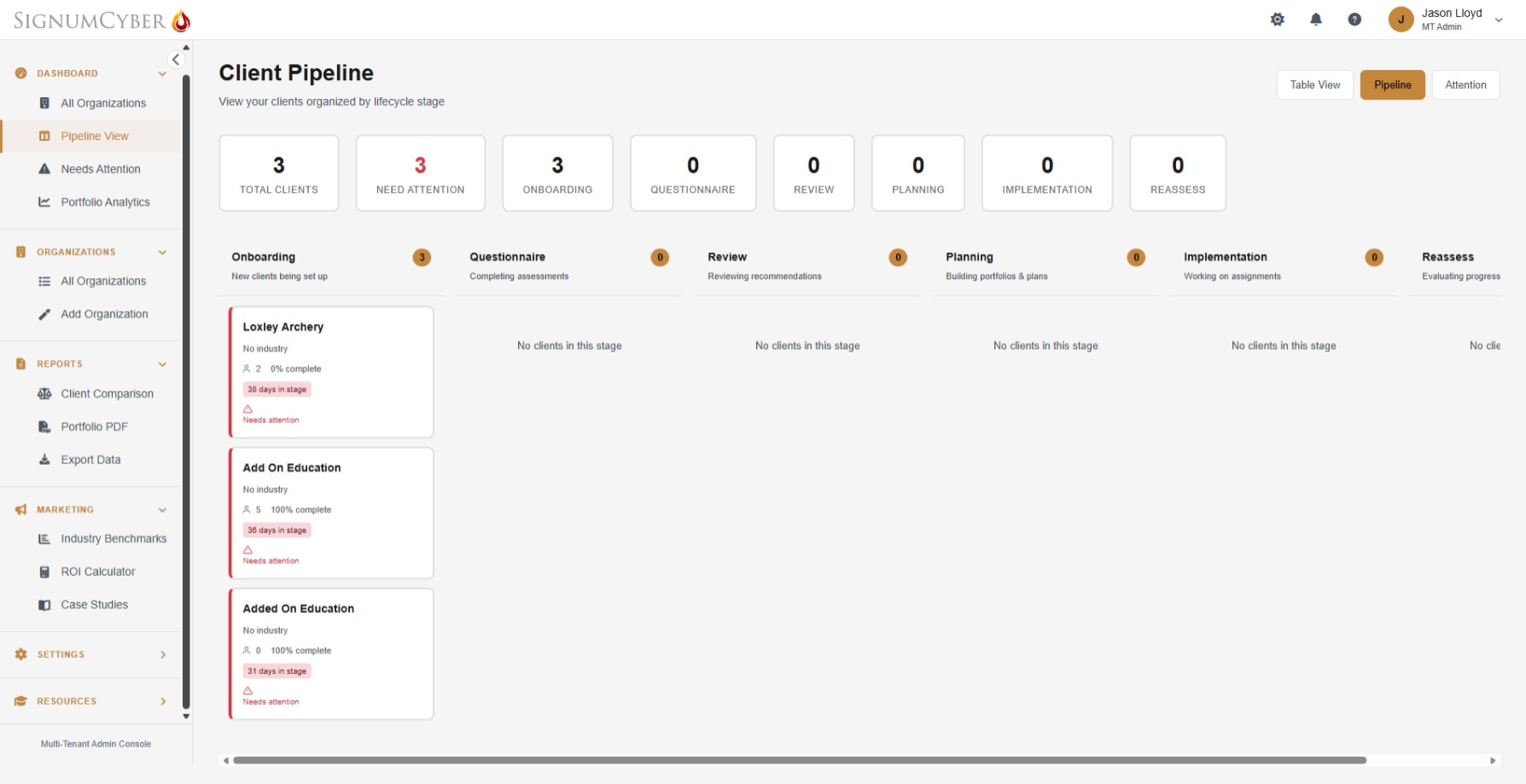
See Every Client's Journey. At a Glance.
Your Pipeline view organizes every client organization by lifecycle stage — from onboarding through reassessment. Each card shows completion percentage, days in stage, and attention flags. Switch between Pipeline, Table, and Attention views to manage your portfolio the way you work.
- Kanban-style pipeline with 6 lifecycle stages — drag-and-drop client progression
- Instant visibility: completion rate, days in stage, and attention flags per client
- Three views — Pipeline, Table, and Attention — to match your workflow
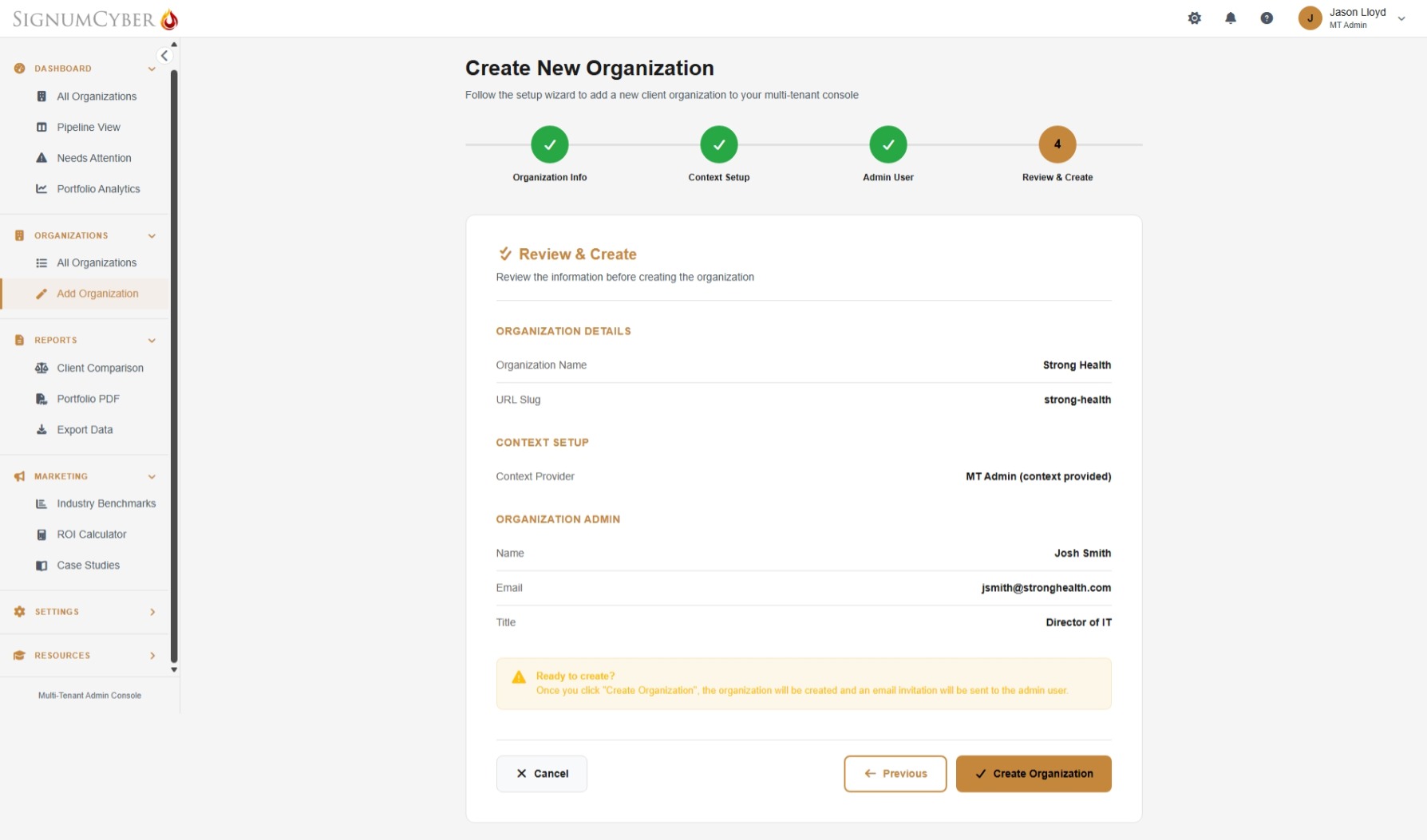
Add a New Client. In Under Five Minutes.
The 4-step wizard walks you through everything: organization name and URL, context questionnaire (fill it yourself or let the client complete it on first login), and first admin user setup. Click “Create Organization” and the client's admin receives an email invitation to set up their password. They get the full SignumEssentials experience — 600+ questions, 5 compliance frameworks, FAIR risk modeling, 582 implementation guides, and Lumi AI.
- 4-step wizard: organization info, context setup, admin user, review and create
- Pre-fill the context questionnaire yourself or let the client handle it on first login
- Every client gets the full SignumEssentials platform — no feature limitations
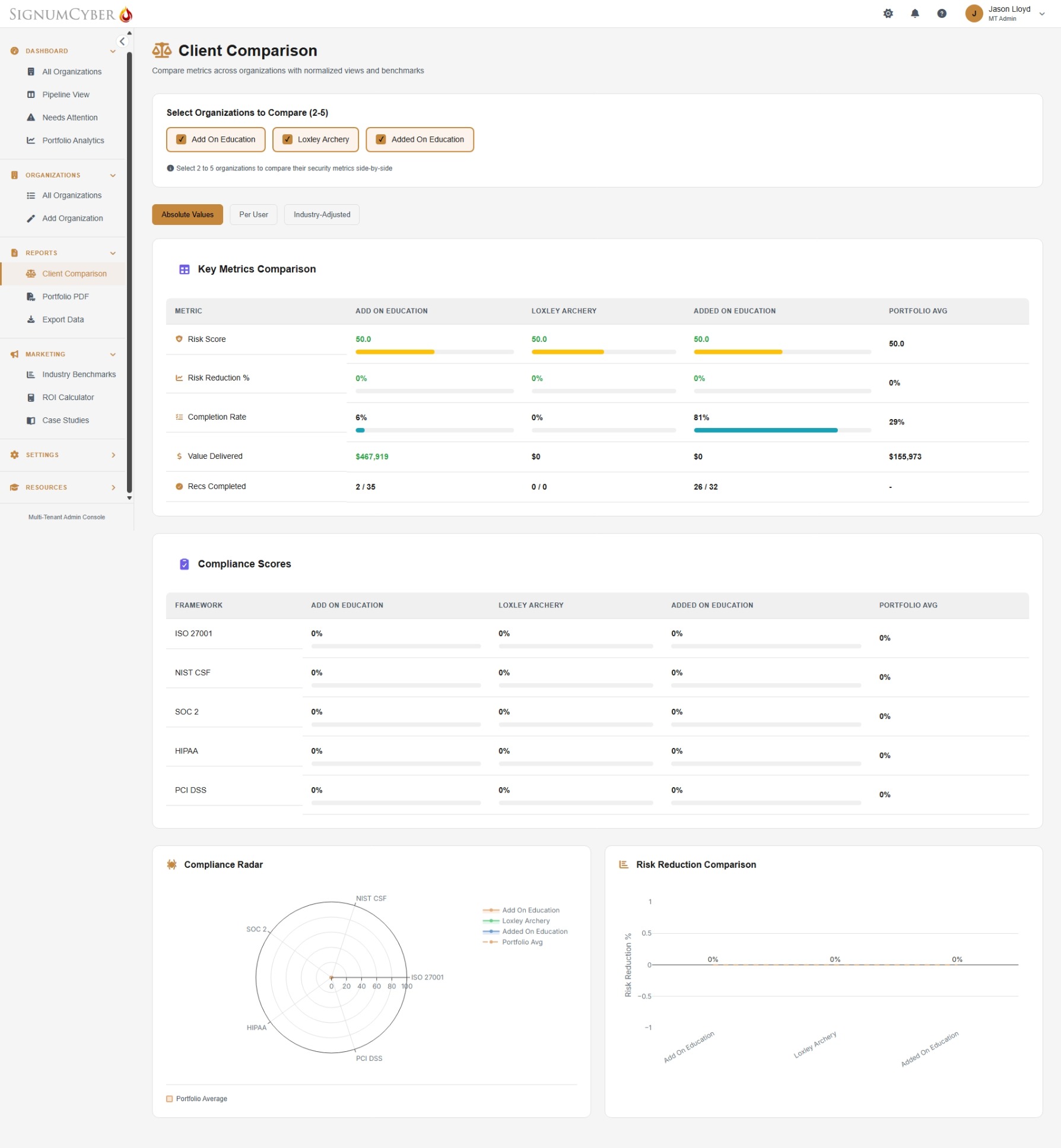
Compare Clients. Spot Patterns. Drive Strategy.
Select 2–5 client organizations for side-by-side comparison. See risk scores, completion rates, value delivered, and recommendations completed — normalized per user or adjusted by industry. The compliance radar overlays multiple frameworks, and risk reduction trends show which clients are improving fastest and which need intervention.
- Side-by-side metrics: risk score, completion rate, value delivered, recommendations completed
- Compliance scores across ISO 27001, NIST CSF, SOC 2, HIPAA, and PCI DSS
- Toggle between absolute values, per-user, and industry-adjusted views
- Compliance radar and risk reduction trend charts for visual storytelling
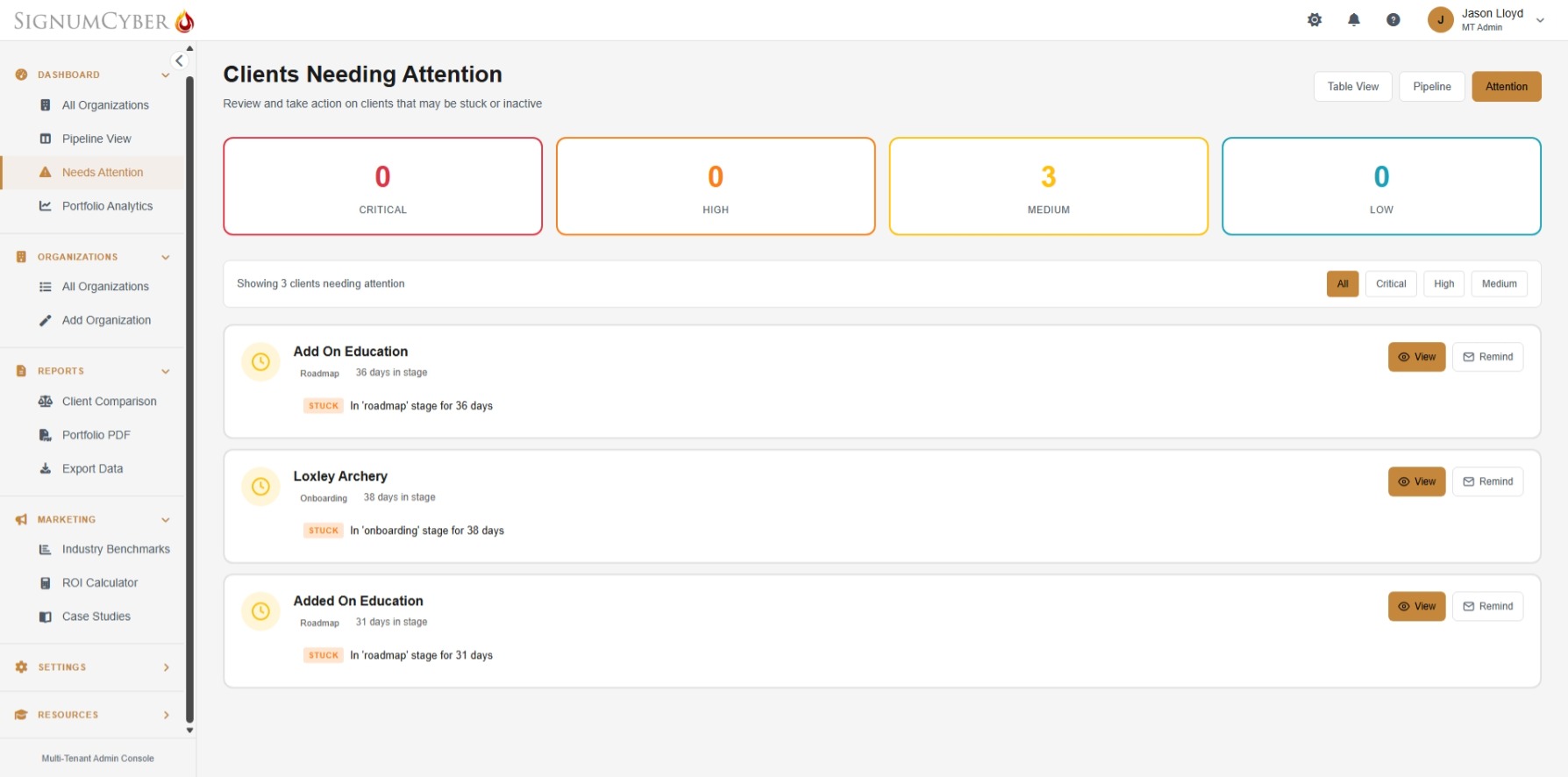
Stalled Clients Surface Before They Churn.
The Attention queue monitors every client organization for signs of disengagement — stalled lifecycle stages, overdue assignments, blocked tasks, and low compliance scores. Alerts are prioritized by severity (Critical, High, Medium, Low) with configurable thresholds. One click to view the client or send a reminder. Weekly portfolio digest emails keep you informed even when you're not logged in.
- Automatic detection: stalled clients, overdue items, blocked assignments, low compliance
- Configurable thresholds — set your own definitions for “stalled” and “overdue”
- Weekly portfolio digest with summary, attention items, upcoming due dates, and recent completions
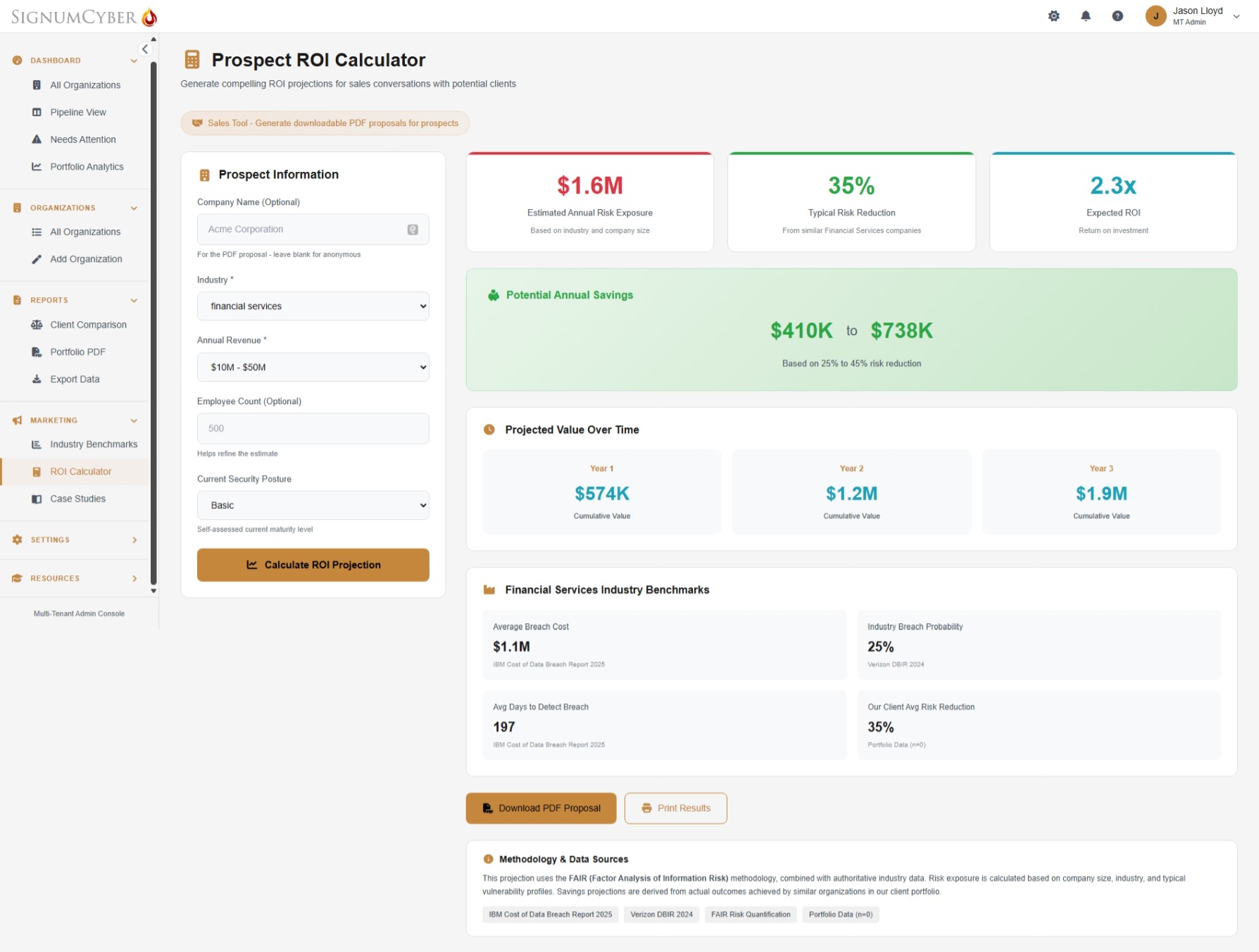
Walk Into Every Sales Meeting With the Numbers.
The built-in ROI Calculator generates compelling projections for prospects based on their industry, revenue, company size, and current security posture. Input a prospect's details and instantly see estimated risk exposure, typical risk reduction, expected ROI, and projected savings over 3 years — all backed by FAIR methodology, IBM Cost of Data Breach data, and Verizon DBIR benchmarks.
- Prospect-specific ROI projections using FAIR methodology and authoritative industry data
- Projected savings by year with cumulative value — Year 1, Year 2, Year 3+
- Present on-screen or print — ready for the sales conversation
Prove Your Results. Win More Clients.
Aggregate anonymized data from your portfolio into powerful sales and marketing intelligence.
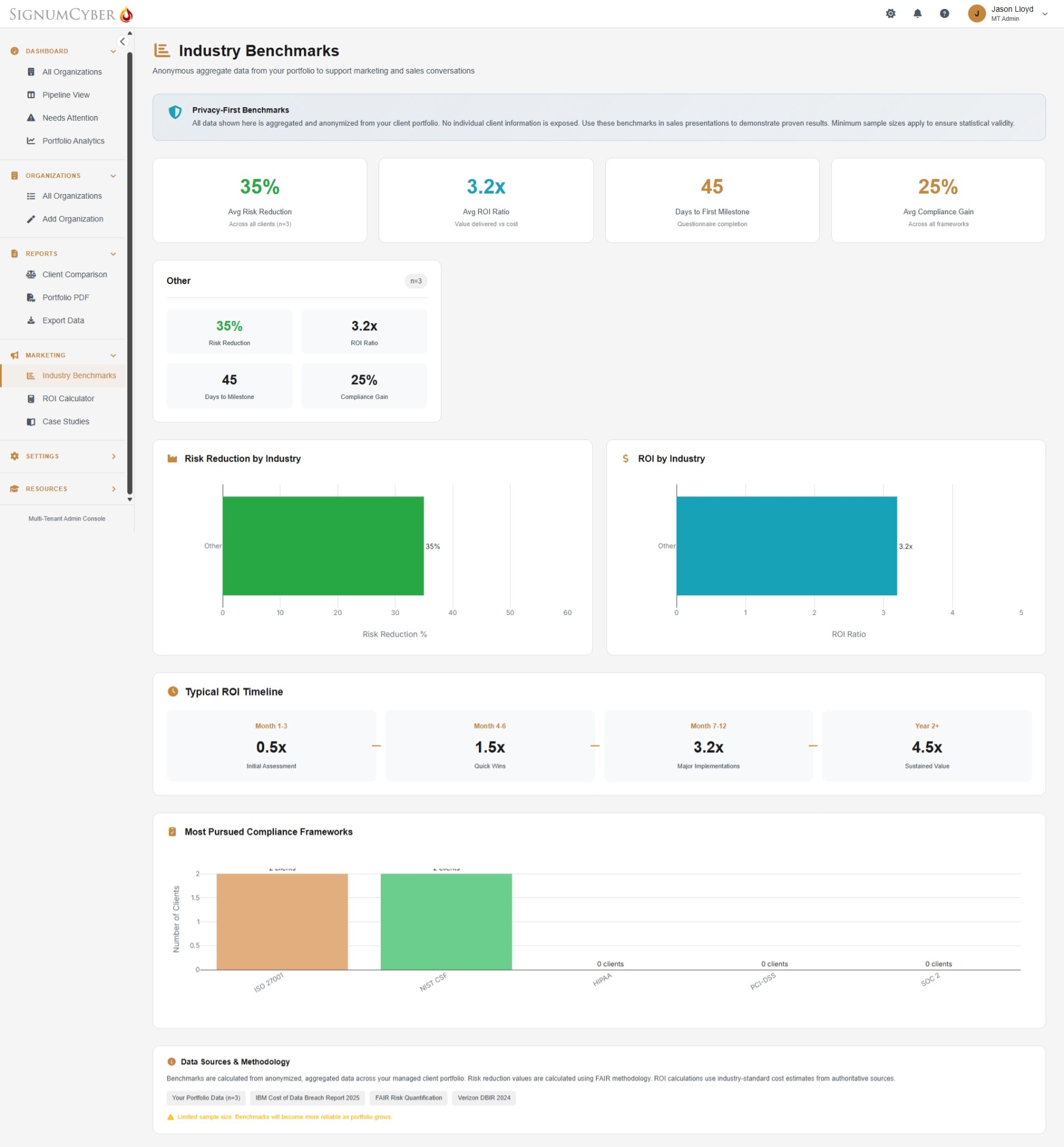
Privacy-first benchmarks — all data anonymized and aggregated. No individual client information exposed.
Plus: Case Studies with consent tracking — request named, anonymous, or pending permission per client. Portfolio PDF reports for quarterly business reviews.
Your First 30 Days
From portal setup to portfolio intelligence. Move at your own pace — many teams complete this faster.
Portal & First Clients
We help you configure your multi-tenant portal, set up your branded subdomain, and onboard your first 2–3 client organizations using the 4-step wizard. Each client admin receives an email invitation to set up their account and begin their SignumEssentials journey.
Clients Start Assessing
Your clients begin their assessments with Lumi AI guidance. Your Pipeline view shows real-time progress across all organizations. Alerts notify you if anyone stalls — before you have to ask.
Portfolio Intelligence
As client assessments complete, your Command Center populates with portfolio-wide analytics — cross-client comparison, compliance radar charts, risk trends, value delivered, and client health scoring.
Scale & Prove
Generate client comparison reports, export ROI data for quarterly business reviews, and use industry benchmarks in sales conversations with new prospects. Add client organizations as your practice grows.
Stop Managing Clients in Spreadsheets. Start Scaling.
Every client organization gets the full SignumEssentials platform — 600+ questions, 582 implementation guides, 5 compliance frameworks, FAIR risk modeling, Lumi AI with guided tutorials, and 25+ one-click reports.
Common Questions.
Consulting firms, vCISOs, MSSPs, and IT service providers who deliver cybersecurity assessments, risk management, or compliance services to multiple client organizations. If you manage security programs for more than one company, SignumVantage is built for you.
Every client receives the full SignumEssentials platform: 600+ expert questions across 6 expertise areas, 5 compliance frameworks mapped simultaneously (ISO 27001, NIST CSF 2.0, SOC 2, HIPAA, PCI DSS), FAIR risk modeling with 7 threat scenarios in dollars, 582 prioritized recommendations with implementation guides, Lumi AI assistant with guided page tutorials, and 25+ one-click reports. No feature limitations — every client gets the enterprise-grade experience.
A 4-step wizard: enter the organization name and URL slug, complete or defer the context questionnaire, create the first admin user, and review. Click “Create Organization” and the client's admin receives an email invitation. The entire process takes under 5 minutes. You can pre-fill the context questionnaire on behalf of the client or let them handle it on first login.
Yes. Three options: Portal Only (all clients log in at portal.signumcyber.com), Your Branded Portal (all clients log in at yourcompany.signumcyber.com), or Per-Organization Portals (each client gets their own subdomain like acme.signumcyber.com).
The Command Center shows portfolio-wide KPIs: total value delivered, portfolio ROI, average risk reduction, recommendations completed, and active client count. The Client Comparison view lets you compare 2–5 organizations side by side — risk scores, completion rates, compliance percentages, and value delivered. The compliance radar overlays multiple frameworks, and risk reduction trends show improvement over time. Client health distribution categorizes organizations as Healthy, At Risk, or Struggling.
The platform monitors all client organizations for stalled lifecycle stages, overdue assignments, blocked tasks, and low compliance scores. Alerts are prioritized by severity (Critical, High, Medium, Low) with configurable thresholds — you define how many days counts as “stalled” and when an item becomes “overdue.” Weekly portfolio digest emails summarize everything: portfolio health, clients needing attention, upcoming due dates, and recent completions.
Yes. The ROI Calculator generates prospect-specific projections using FAIR methodology, IBM Cost of Data Breach data, and Verizon DBIR benchmarks — ready to present in any sales conversation. Industry Benchmarks aggregate anonymized portfolio data for sales presentations. Case Studies management tracks client permission (Named, Anonymous, Pending, No Permission) for using success stories in marketing. All tools are designed to help you win and retain clients.
SignumEssentials is for organizations managing their own security program — one tenant, one organization, unlimited users. SignumVantage is for firms managing security programs across multiple client organizations. Vantage includes everything in Essentials plus the multi-tenant command center, portfolio analytics, client pipeline management, proactive alerts, cross-client comparison, branded portals, and built-in sales and marketing tools. Not sure which fits? Request a demo and we'll help you find the right path.
Still have questions? Get in touch — we'd love to help.
Ready to Scale Your Practice
With SignumVantage?
See how the multi-tenant command center, portfolio analytics, and built-in sales tools can help you manage more clients, prove more value, and grow your business.
30 minutes. No pressure. Just clarity on how to scale.