See Your Entire Security Program. In One Place.
The platform that replaces spreadsheets, consultant PDFs, and guesswork with a living, quantified view of your security posture.
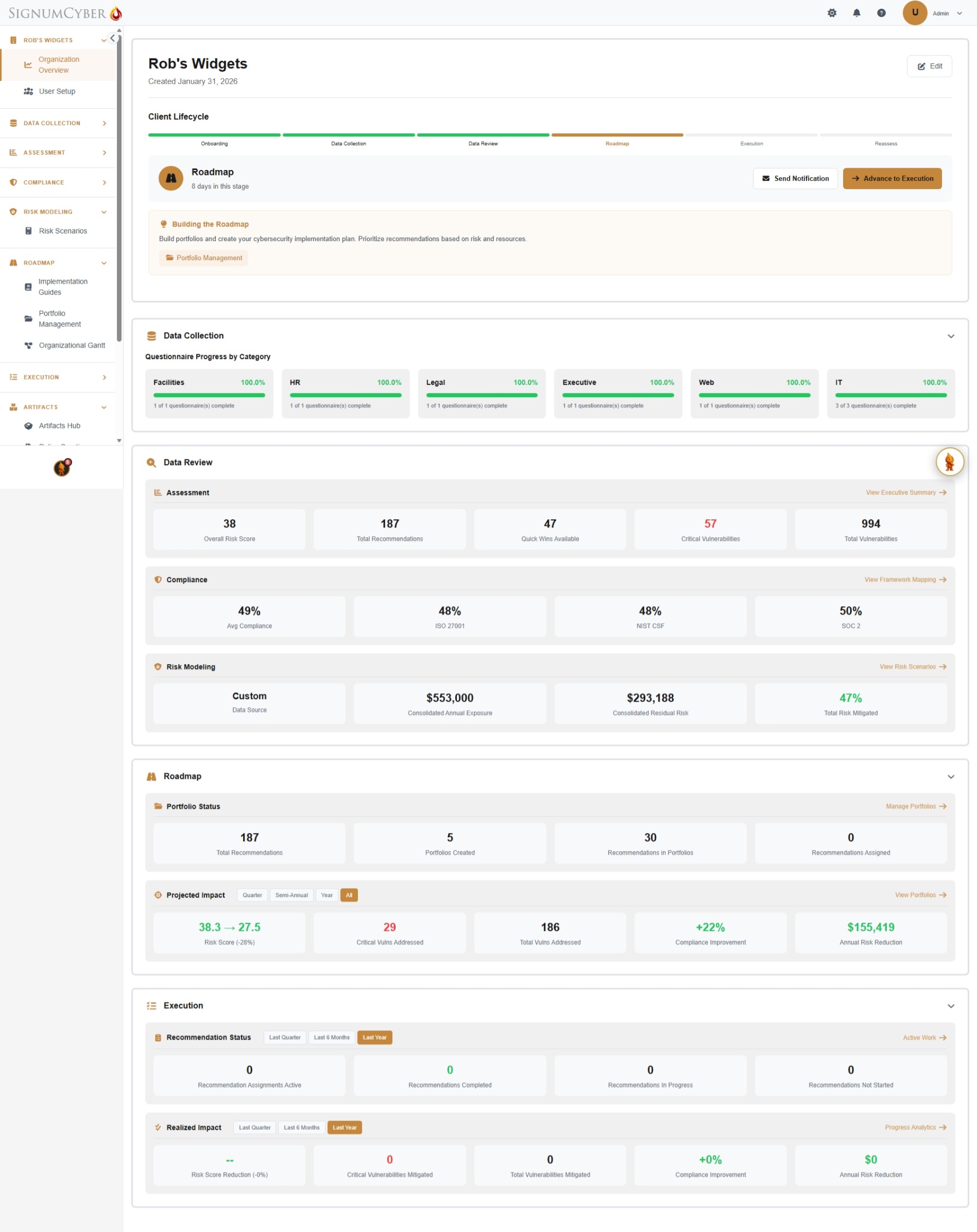
One Platform. Six Stages. Complete Coverage.
SignumEssentials guides your organization through a structured lifecycle — from first question to board-ready proof of progress.
Each stage builds on the last. Your dashboard shows exactly where you are.
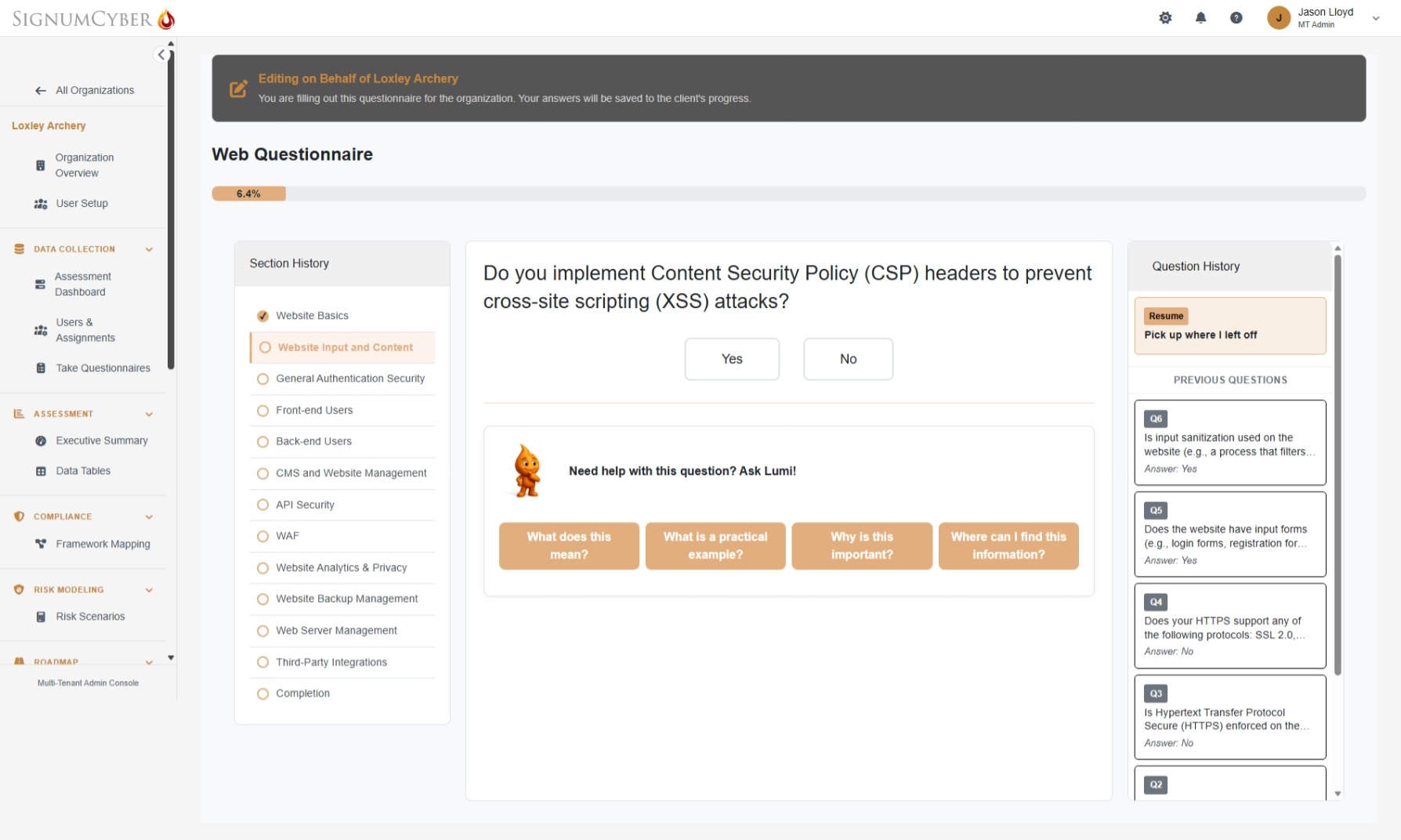
600+ Questions. 6 Expertise Areas. AI at Your Side.
Each team member sees only the questions relevant to their role — distributed across 6 expertise areas: IT, HR, Legal, Facilities, Executive, and Web Development. IT is split into 3 focused questionnaires by topic (General IT, Network & Infrastructure, IT Access & Data), giving you 8 targeted questionnaires in total. Lumi, your AI assistant, sits beside every question with four instant help options: explain the concept, show a practical example, explain why it matters, and point you to the right information. Answers auto-save. Pick up where you left off anytime.
- 8 questionnaires across 6 expertise areas — no single person answers everything
- Lumi AI explains every question with 4 context-sensitive help options
- Section history, question history, and resume — never lose your place
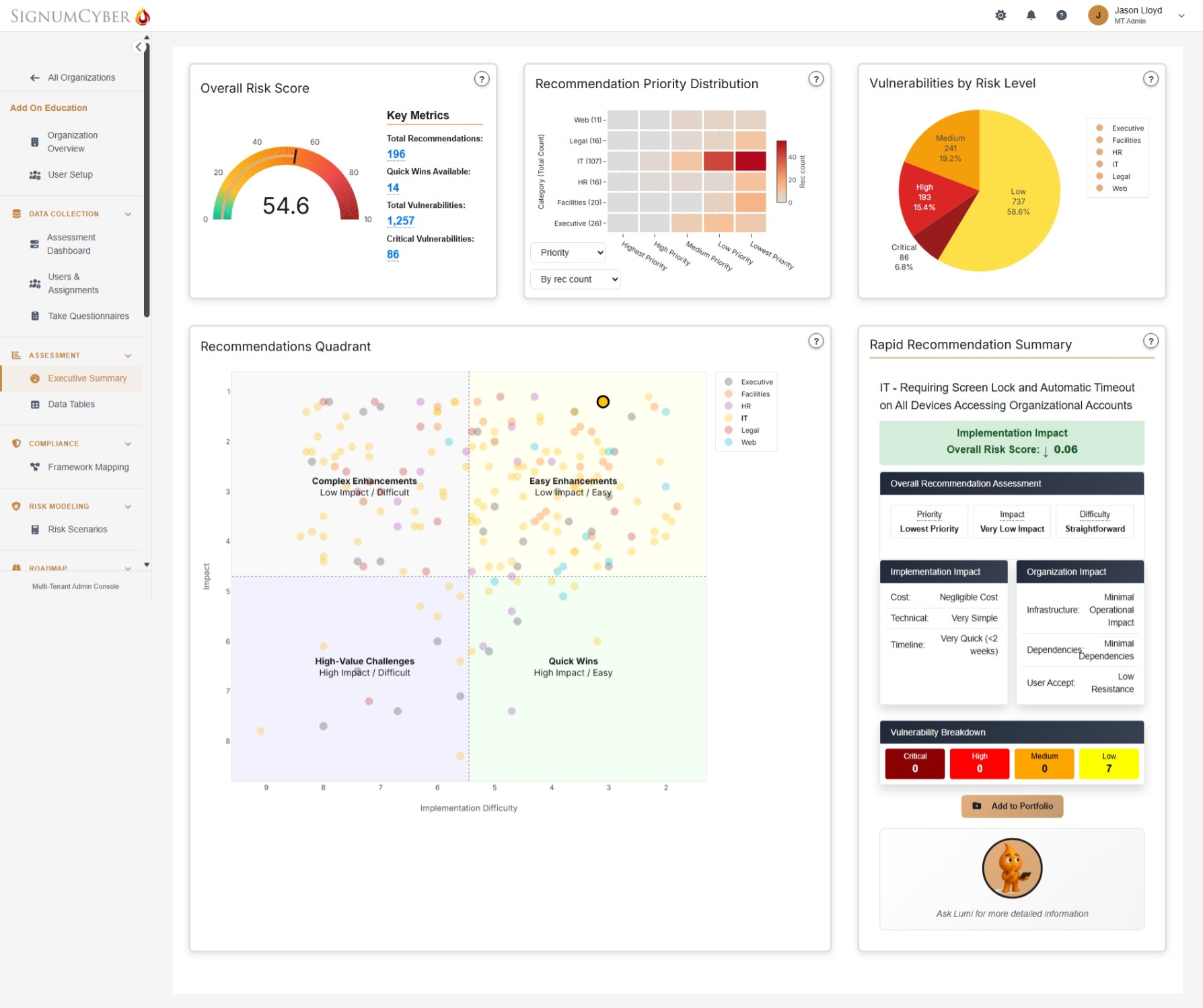
Results Unlock as You Answer. Not After.
The moment your first questionnaire is submitted, your dashboard starts populating. Your overall risk score, prioritized recommendations, vulnerability landscape, and compliance gaps appear in real time. Click any dot in the Recommendations Quadrant to see a full breakdown — priority, impact, difficulty, implementation cost, timeline, and organizational dependencies — all scored across 6 factors.
- Overall Risk Score on a 0–100 scale with key metrics at a glance
- Recommendations Quadrant plots every action by impact vs. difficulty — Quick Wins highlighted
- 4,000+ vulnerabilities in our database, identified and scored by impact, likelihood, and risk
- Click any recommendation for 6-factor scoring: cost, complexity, impact, compliance value, acceptance, timeline
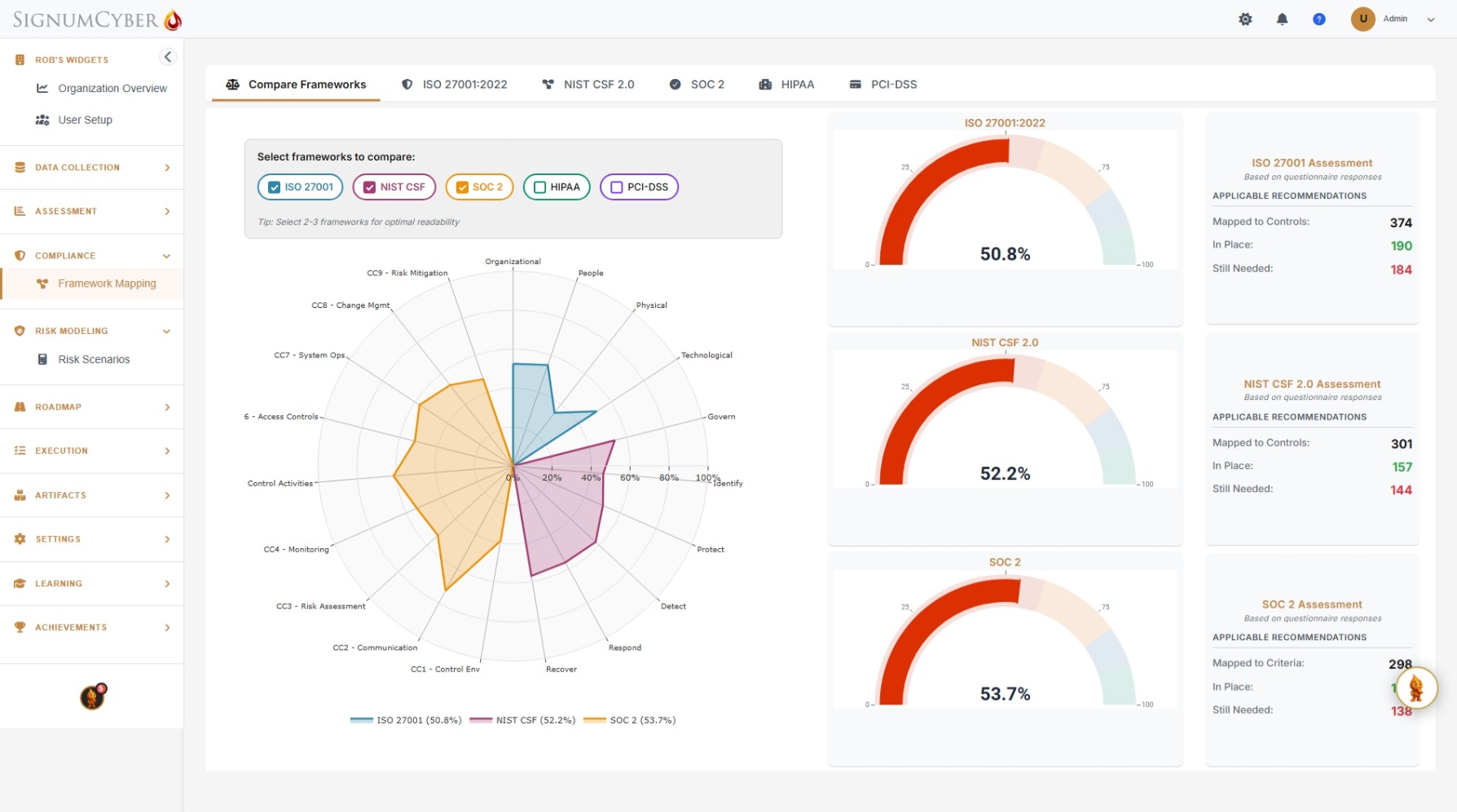
Five Frameworks. One Assessment.
Every questionnaire answer maps simultaneously to ISO 27001, NIST CSF 2.0, SOC 2, HIPAA, and PCI DSS. Compare your compliance posture across frameworks with an interactive radar chart. Drill into any framework to see exactly which controls are in place, which have gaps, and which recommendations will close them.
- Interactive radar chart overlays multiple frameworks for side-by-side comparison
- Per-framework compliance percentage with mapped controls, in place, and still needed
- Each gap links directly to the recommendation that closes it — no guesswork
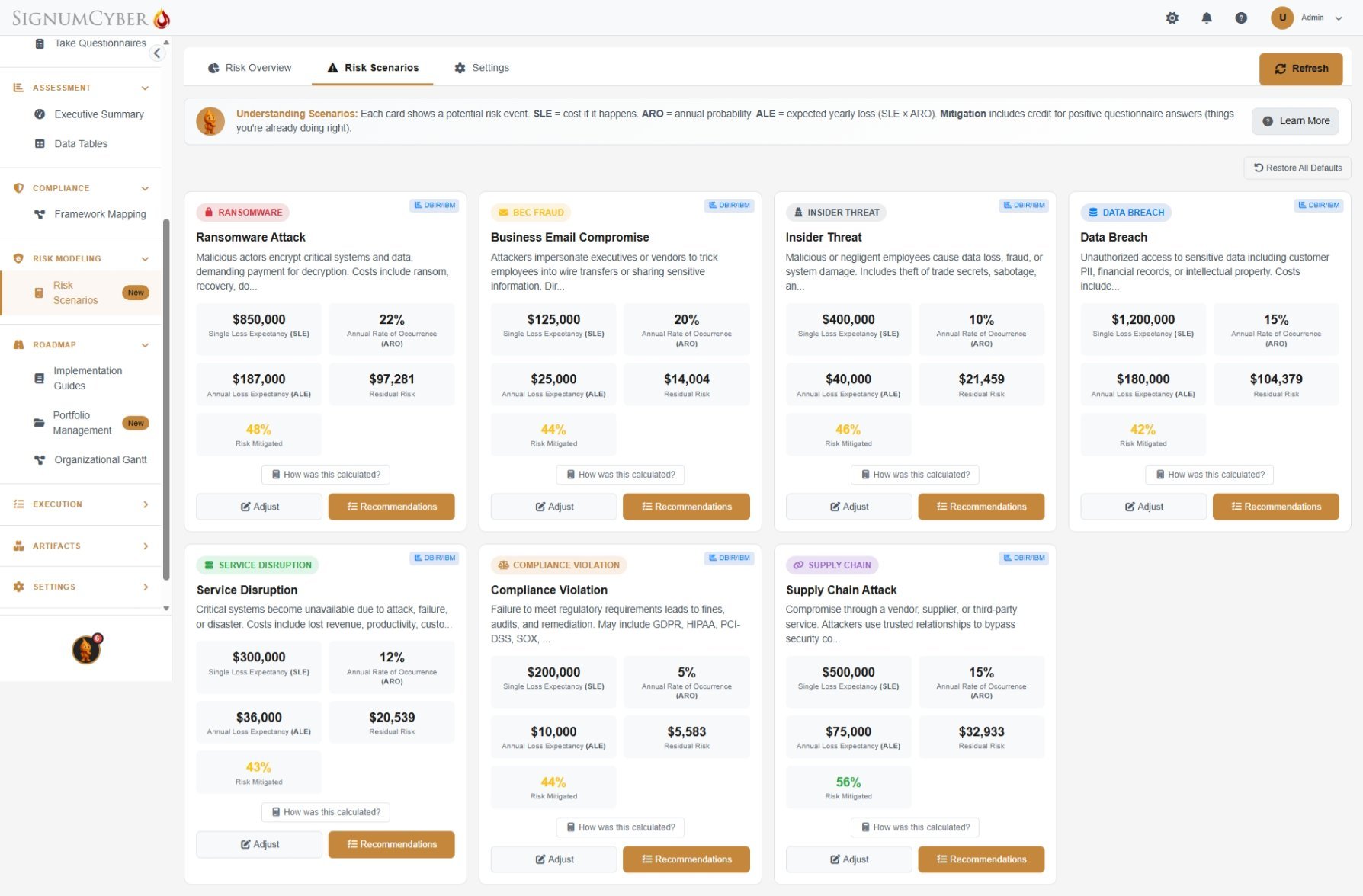
Translate Risk Into the Language of Business.
Model 7 real-world threat scenarios using FAIR methodology. Each scenario calculates Single Loss Expectancy, Annualized Rate of Occurrence, and Annual Loss Expectancy — scaled to your industry, revenue, and existing controls. See exactly how much risk your current posture mitigates and where exposure remains. Every calculation is transparent — click “How was this calculated?” to see the math.
- 7 scenarios with real dollar figures: ransomware, data breach, BEC, insider threat, service disruption, compliance violation, supply chain
- Each scenario shows SLE, ARO, ALE, residual risk, and percentage mitigated by your current controls
- Choose your data source — industry benchmarks (DBIR & IBM), your own estimates, or a hybrid — and see how results shift
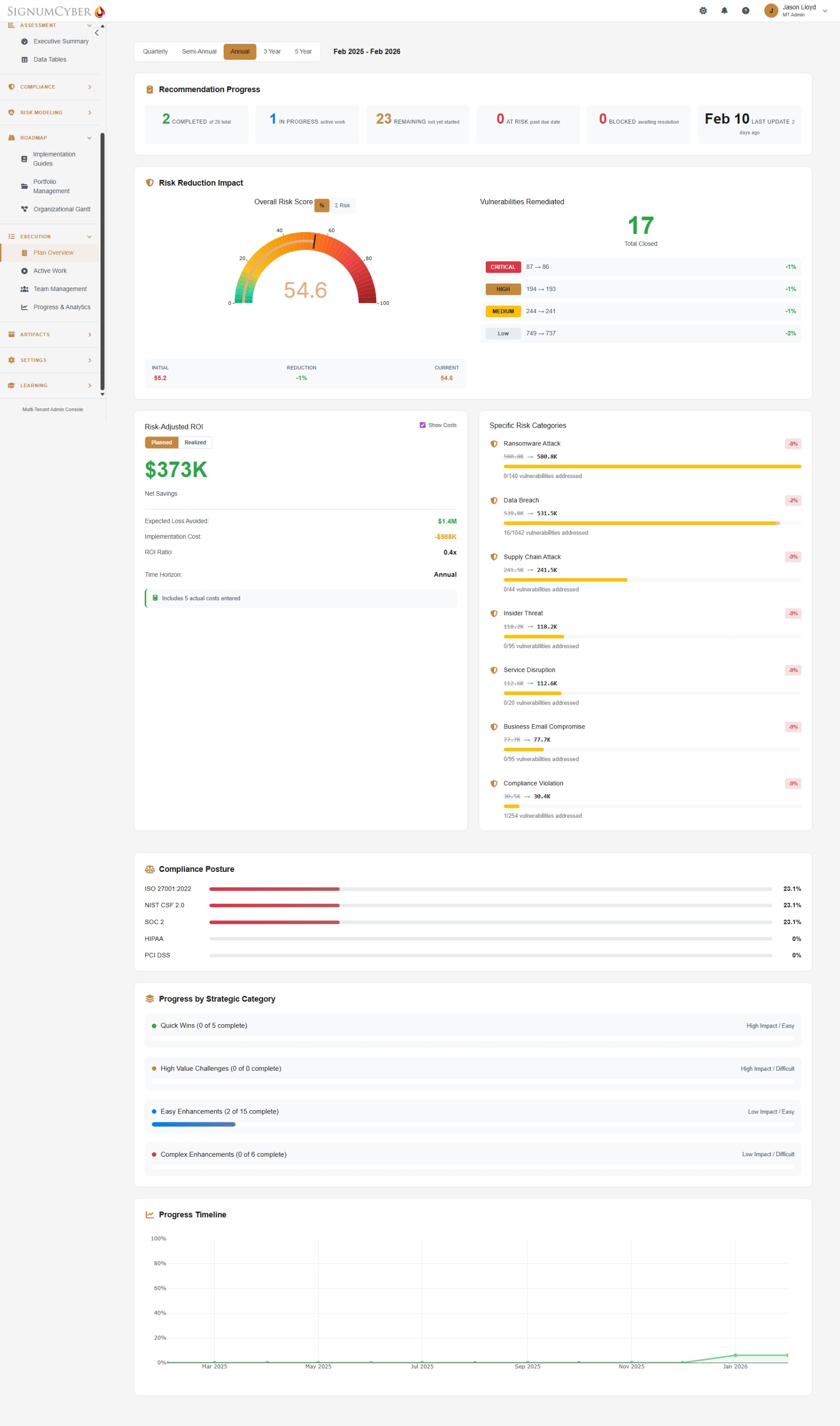
From Recommendations to Measurable Results.
Turn assessment insights into action. Build implementation portfolios, assign recommendations to team members with due dates, and track progress on an interactive Gantt chart. The Plan Overview dashboard shows your impact in real time — risk reduction in dollars, vulnerabilities remediated by severity, compliance improvement by framework, and projected ROI. See exactly what your security investment is returning.
- Risk-Adjusted ROI calculated automatically — expected loss avoided vs. implementation cost
- Interactive Organizational Gantt chart with drag-to-reschedule timelines, status tracking, and deadline management
- Team workload management with imbalance detection and milestone tracking
- Progress analytics with burndown charts, department-level radar, and completion history
25+ Reports. Every Audience Covered.
From board presentations to audit documentation — generate exactly what each stakeholder needs, in seconds.
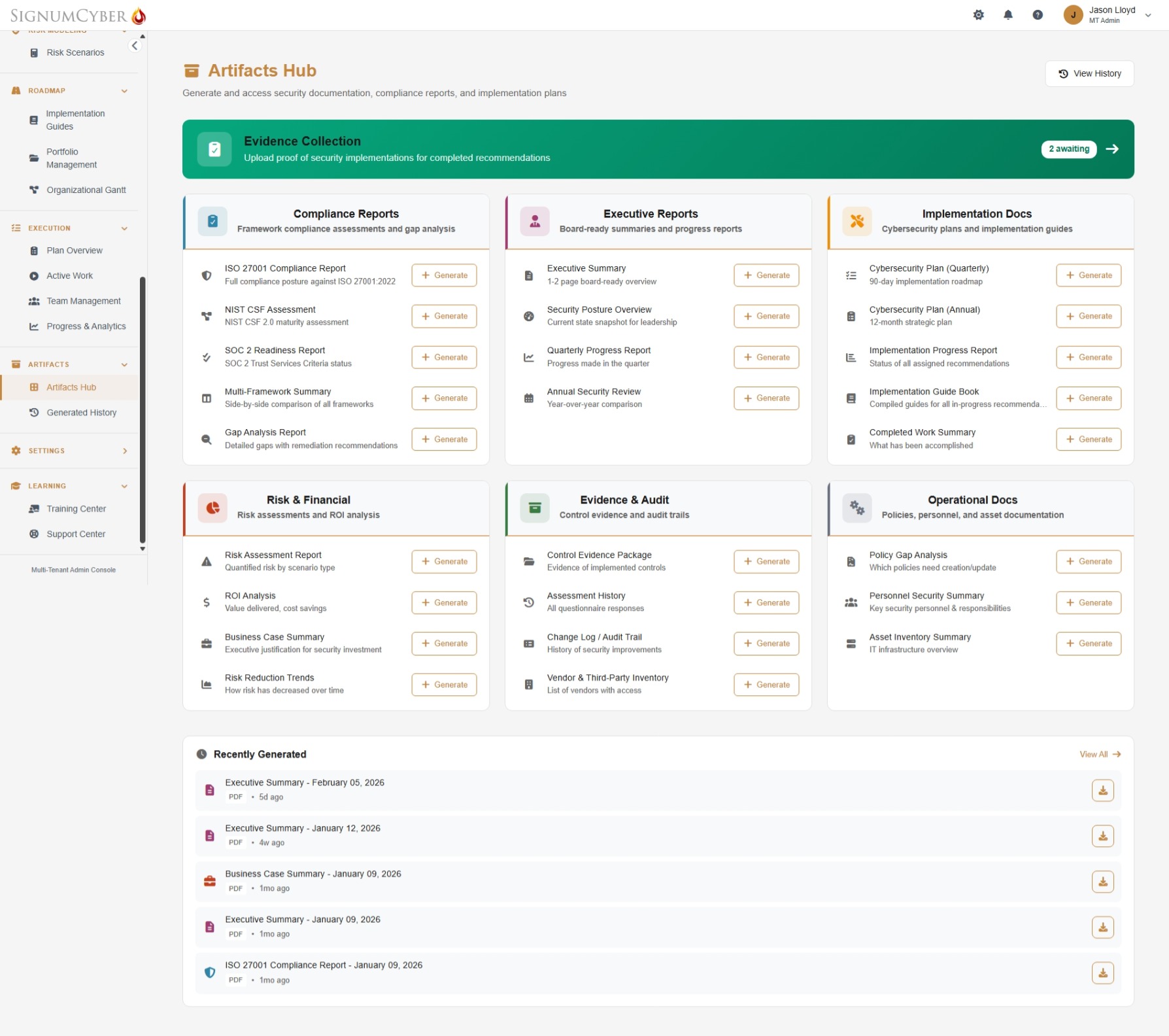
All reports pull live data from your assessment. Available in PDF and DOCX. Historical comparison included.
Plus: 12 one-click security policies — Data Classification, Incident Response, BYOD, Backup, Business Continuity, and more. Generated from your assessment data, ready to customize.
Your First 30 Days
From first login to first board presentation. Move at your own pace — many teams complete this faster.
Setup & Launch
We help you configure your tenant, set up roles (Administrator, Viewer, or 8 pre-built templates like Project Manager, Compliance Officer, or Board Member), enable MFA, and distribute questionnaires across your team by expertise.
Assessment & Insights
As answers come in — with Lumi AI helping your team understand every question — your dashboard unlocks progressively. Risk scores, compliance radar charts, prioritized recommendations, and dollar-quantified risk scenarios appear in real time.
Plan & Execute
Build your first implementation portfolio. Assign quick wins to team members on the Organizational Gantt chart. Start tracking progress, uploading evidence, and watching your Risk-Adjusted ROI climb.
Reassess & Prove
Run your first reassessment. Generate board-ready reports from the Artifacts Hub — executive summaries, compliance posture comparisons, and risk reduction trends in dollars.
Not Another Checkbox Tool. A Complete Platform.
Consultants charge $50K–$150K for a point-in-time PDF that's outdated within months. Compliance automation tools monitor technical controls but can't assess governance, policy, or operational processes. SignumEssentials covers it all — continuously.
Common Questions.
We help you set up your dedicated tenant, configure your organization profile (industry, size, compliance requirements), and help you invite your team. You'll choose from 3 built-in roles (Administrator, Viewer, User) or 8 pre-built templates like Project Manager, Compliance Officer, Board Member, or External Auditor. MFA and SSO are configured during setup, along with Flow Control settings to manage how your team experiences the assessment. Most teams are up and running within a day.
Yes — that's exactly how it's designed. The assessment includes 8 questionnaire categories: General IT, Network & Infrastructure, IT Access & Data, Executive, HR & Personnel, Legal & Compliance, Facilities & Physical Security, and Web Development. Each person only sees questions relevant to their expertise. An admin dashboard lets you track who's assigned what and monitor completion progress across the entire organization with a visual timeline.
The platform models these real-world threat scenarios using FAIR methodology: (1) Ransomware Attack, (2) Data Breach, (3) Business Email Compromise, (4) Insider Threat, (5) Service Disruption, (6) Compliance Violation, and (7) Supply Chain Attack. Each scenario calculates Single Loss Expectancy, Annualized Rate of Occurrence, and Annual Loss Expectancy — all scaled to your organization's size, industry, and current posture. Click “How was this calculated?” on any scenario to see the full math.
Each of the 582 recommendations includes a full implementation guide with: the risks of not implementing, specific mitigation strategies, step-by-step recommended actions, and additional considerations for your environment. For example, a data retention recommendation includes how to conduct a data inventory, research regulatory requirements, develop retention schedules, implement technical enforcement, and establish ongoing review processes. These aren't generic checklists — they're practical, actionable playbooks.
Yes. SignumEssentials includes a full implementation management system. Create portfolios of recommendations, assign them to team members with due dates and champions, then track progress on an interactive Organizational Gantt chart with drag-to-reschedule timelines. The platform monitors team workload and detects imbalances, tracks milestones and deadlines, and provides a “Your Focus This Week” view so every team member knows exactly what to work on next. Progress analytics include burndown charts, department-level radar charts, and completion history — plus a real-time Risk-Adjusted ROI showing expected loss avoided versus implementation cost.
The Artifacts Hub generates 25+ report types across six categories: Compliance, Executive, Implementation, Risk & Financial, Evidence & Audit, and Operational. All reports are one-click generation in PDF and DOCX with live data and historical comparison. Plus, generate 12 ready-to-customize security policies including Data Classification, Incident Response, BYOD, and Business Continuity.
Yes. Lumi provides guided tutorials and feature tours on every page of the platform, walking your team through each capability step by step. Your team learns by doing — directly within the tool they'll use every day. Progress is tracked per user, and completion data feeds into your overall organizational readiness metrics.
SignumEssentials is for organizations building and managing their own security program — one tenant, one organization, unlimited users. SignumVantage is for firms delivering security leadership across multiple client organizations — consultants, vCISOs, and MSSPs. Vantage includes everything in Essentials plus portfolio-level visibility, cross-client analytics, branded deliverables, pipeline management, and multi-tenant administration. Not sure which fits? Request a demo and we'll help you find the right path.
Still have questions? Get in touch — we'd love to help.
Ready to See SignumEssentials
in Action?
See how your organization's security posture translates into financial risk, prioritized action, and measurable progress — in a personalized walkthrough built around your challenges.
30 minutes. No pressure. Just clarity on where you stand.